A sales system that keeps up with a busy counter.
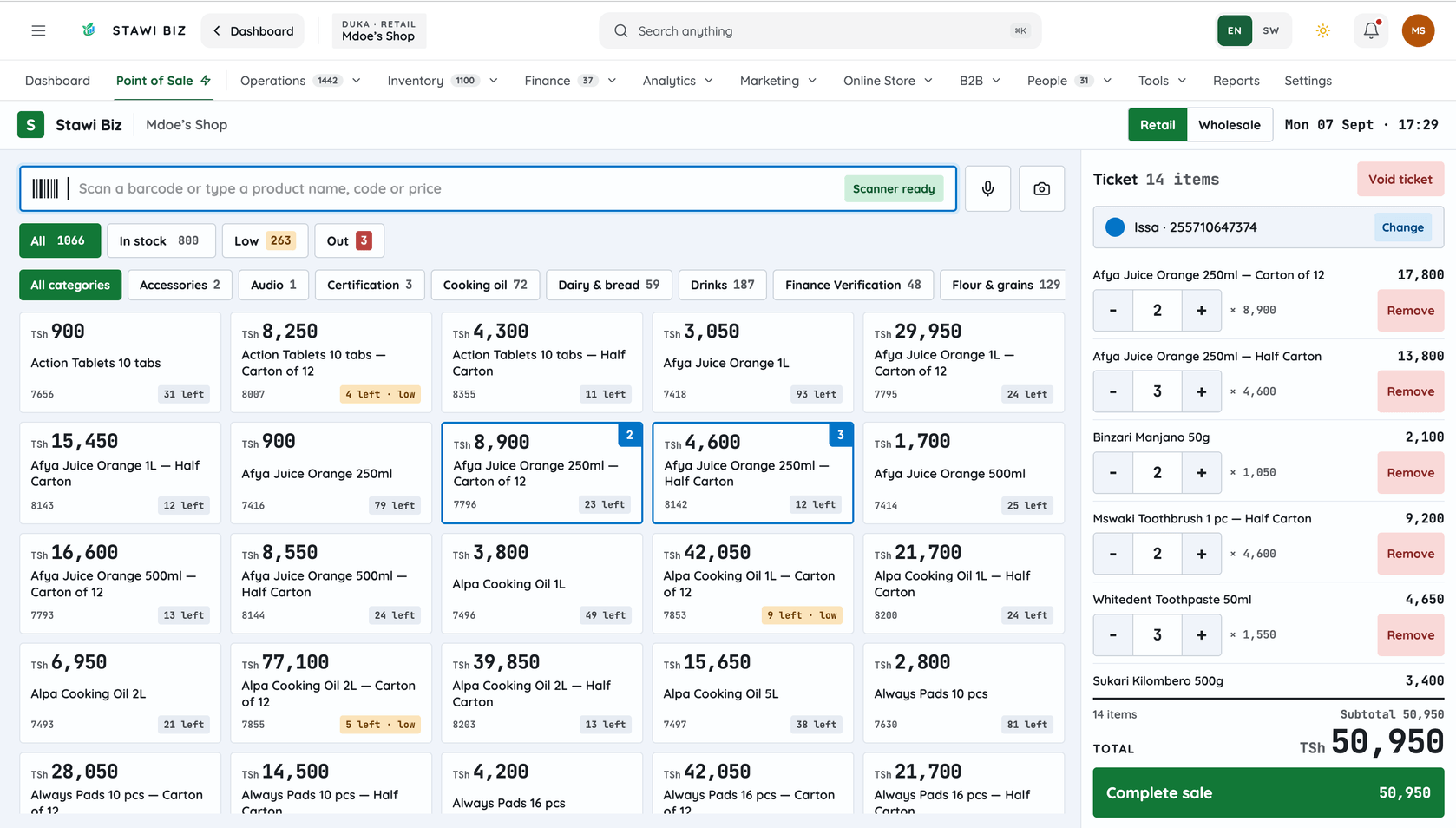
Scan or type, take cash, M-Pesa or credit, and the receipt is on the customer's WhatsApp before they leave. Stock, debts and your day's report update with every sale — on a phone, a computer, or the installed till that keeps selling when the internet dies.
- Stock dropped
- Receipt on WhatsApp
- Ledger written
- Evening report
Everything a till needs. Nothing that needs a bookkeeper.
Scan a barcode or type a name
The camera on any phone works as a scanner, or plug in a real one. Type three letters and the product is there.
Cash, mobile money, credit
Cash with change, M-Pesa, Tigo Pesa, Airtel Money, HaloPesa, bank, or a split. Or put it on the customer's account.
The receipt goes to WhatsApp
Or prints on a receipt printer if you have one. Either way the customer has it before they reach the door.
Stock drops as you sell
Every product shows what is left, and warns you before it runs out. Sell by piece, dozen or carton.
Shifts and the cash drawer
Open a shift, close it, and see expected cash against counted cash. A short drawer shows up the same evening.
Returns and voids with a reason
A refund or a cancelled sale is recorded, with who did it and why. Nothing quietly disappears.
The installed till keeps selling.
Connections drop. A counter cannot. The desktop till is installed on the shop's computer and sells with no internet at all; sales made on a phone queue up and sync when the signal returns.
- Desktop till, offline. Sell, print receipts and count the drawer with no connection. Everything syncs when it is back.
- Phone sales queue. A sale made on the phone with no signal is kept and sent later. You can see what is waiting.
- What needs internet. The dashboard, reports from other branches and WhatsApp receipts. We say so plainly.
What is a sales system (POS)?
A sales system, or POS, is software that records every sale as it happens — the item, the price, the payment method and the customer — and updates stock, customer debts and reports on the spot. Instead of a notebook, every transaction lands in one system you can see on a phone, a computer or an installed desktop till.
Stawi Biz is a sales system built for Tanzanian businesses: retail shops, pharmacies, restaurants and salons. It records cash, mobile money and credit sales, sends receipts by WhatsApp, tracks stock by barcode, and gives the owner a day's report without waiting for closing. Offline selling is limited to the installed desktop till and the mobile sale queue; connected reports need internet.
Who is it for?
- Retail shops and supermarkets — barcodes, discounts, staff shifts and a daily stock count.
- Pharmacies and chemists — dispensing by unit, batch and expiry tracking, insurer claim records. Internal records; no regulator approval is implied.
- Restaurants, bars and cafés — table orders, kitchen and counter in one system.
- Salons and spas — customer bookings alongside product sales.
Start with the till. Add the rest when you need it.
Duka POS — sell, keep stock and see the day's report — is TSh 10,000 a month. Retail plans with a customer book, credit sales, WhatsApp and more are TSh 15,000, TSh 25,000 and TSh 35,000. Every plan starts with 14 days free, no card.
Duka POS
Just the till: sell, keep stock, see the day
- Sell from a phone, a computer or the installed till
- Stock that drops with every sale, and a warning when it runs low
- Today's sales, profit and cash on your phone
No customer book, credit sales or WhatsApp — those start at Starter.
Starter
Add customers, credit and WhatsApp
- A customer book: who buys what, and how often
- Sell on credit (mkopo) and see who owes you
- Receipts and alerts on WhatsApp
Professional
Alerts, campaigns and up to five branches
- See what each cashier sold, and when
- Debt reminders go out by SMS on their own
- Alerts when stock goes missing, a product stops earning, a regular stops coming or a debt goes late
- Ask for today's report on WhatsApp
- Send offers by SMS or WhatsApp to all your customers, or a group of them
- Reports as PDF or Excel, to download, print or send
- Which products, hours and staff make you money
- Suppliers, purchase orders and what you owe them
- An online shop your customers order from
Enterprise
No limits, mobile-money collection, training
- Collect M-Pesa, Tigo Pesa and Airtel Money in the app, with payment links
- Priority support on WhatsApp
- Training for your staff
Sales system questions, answered
What is a sales system?
Software that records sales, payments and stock at the same time. Each sale entered reduces stock, updates the customer's debt and changes the owner's report immediately.
Can I use the sales system without internet?
The installed desktop till keeps selling when the connection drops, and the mobile sale queue holds sales until internet returns. The dashboard, connected reports and WhatsApp receipts need internet.
Does it support both retail shops and pharmacies?
Yes. A pharmacy runs as its own business type, with batch tracking, expiry alerts and claim records. A shop with a pharmacy counter adds the second type at half its price.
Is there a free trial?
Yes — 14 days free on any plan, with no card.
Can I use WhatsApp with the sales system?
Yes. Receipts go to the customer on WhatsApp when they pay, and daily reports can be sent to the owner once the WhatsApp channel is configured.
What devices does the sales system run on?
A phone, a computer browser, and an installed desktop till. Supported barcode scanners and receipt printers connect directly.
Try the till for 14 days.
Bring your products, sell for two weeks, and see whether the evening report tells you something new.